My AXE Commercial Died in a Budget Meeting. Five Years Later, I Brought It Back with AI
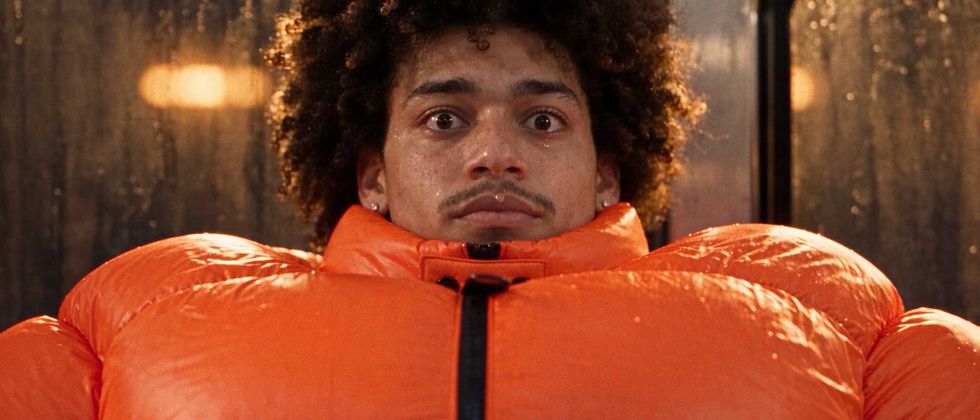
In 2021, I pitched to direct an AXE commercial developed at The Martin Agency. The premise? A guy gets so sweaty on a New York subway that his enormous orange puffer jacket starts inflating like a human pressure cooker, eventually unleashing a biblical amount of sweat onto a train full of horrified commuters. Think Titanic meets Speed . With deodorant. It was big, cinematic, ridiculous, and full o

In 2021, I pitched to direct an AXE commercial developed at The Martin Agency.
The premise? A guy gets so sweaty on a New York subway that his enormous orange puffer jacket starts inflating like a human pressure cooker, eventually unleashing a biblical amount of sweat onto a train full of horrified commuters.
Think Titanic meets Speed. With deodorant.
It was big, cinematic, ridiculous, and full of elaborate VFX. Basically, everything I love.
Unfortunately, it was also expensive!
The project was shelved for budgetary reasons, and the concept disappeared into the place where so many great ideas go to die: a folder labeled "FINAL_FINAL_v7."
Tragic.
But here's the thing about directors: we tend to have a hard time letting things go.
Five years later, an opportunity fell into my lap. I started working as a creative director with co-founder Philip Ho and the team at Absurd, a collaborative AI filmmaking platform designed to help filmmakers tackle ambitious projects.
What intrigued me was that this platform brought different AI models and production tools into one organized workspace, with a collaborative memory that could keep track of characters, locations, creative decisions, and feedback as a project evolved.
Essentially, it was designed to work the way filmmakers actually work.
And that got me thinking: "What if I finally made that AXE spot?"
So that's what I did.
The result is For Days That Run Hot, a 60-second unofficial AXE spec commercial made using AI. And no, before you ask, I didn't type "make an awesome AXE commercial" into a chatbot and go get a margarita.
I wish.
Instead, I approached it the way I've approached directing commercials for brands like Pepsi, Coca-Cola, and Amazon. I developed the treatment. Cast the characters. Designed the wardrobe. Scouted my locations. Built the shot list. Storyboarded the action. Planned the coverage.
I just did it with an entirely different set of tools.
Here's how.
1. First, I Made a Treatment Because I’m a Control Freak
One strange thing about AI filmmaking is how many people start generating images before they've figured out what they're making. To me, that's a little like hiring a cinematographer before you've written a script.
Sure. Go nuts. See what happens. It’s probably going to be slop.
I always start with a treatment.
To me, a director’s treatment is the Bible. It's where I figure out exactly what I'm making, how I'm going to shoot it, and what the hell it's all supposed to look and feel like. I spend an enormous amount of time researching, developing references, designing shots, and storyboarding so that by the time I get to set, everyone knows exactly what movie we're making. Most of what ends up on screen starts in those pages.
So when I decided to resurrect this AXE spot, I wanted to start exactly where I would on a live-action production.
I went back to my original treatment from 2021, complete with its janky Photoshop composites, and decided to rebuild the whole thing using Absurd. Partly this because I wanted to revisit the creative with fresh eyes. And partly because this was the perfect opportunity to pressure-test the software against a project I'd already developed using my traditional workflow.
Also, this time I had complete creative freedom. No agency notes. No revisions. No one telling me to make it more “client-friendly.’ MUAHAHAHA.
I wrote the treatment myself, as I always do, but used Absurd's image library and visual development tools to elevate the design.
I could bring in my own references, generate new ones, explore lighting, characters, and locations, and organize everything into polished visual pages without constantly jumping between different programs. Some of those tragic little Photoshop creations from five years ago finally got the glow-up they deserved.
Once the treatment was finished, I took it one step further and used GPT Astra to turn it into an interactive website.
Explore the interactive AXE treatment here
That was pretty wild. I'd taken a concept I'd developed years earlier and used AI to dramatically elevate the presentation, without handing over the actual creative thinking. I can totally see this being a useful tool on future real-world projects.
But I wasn't finished.
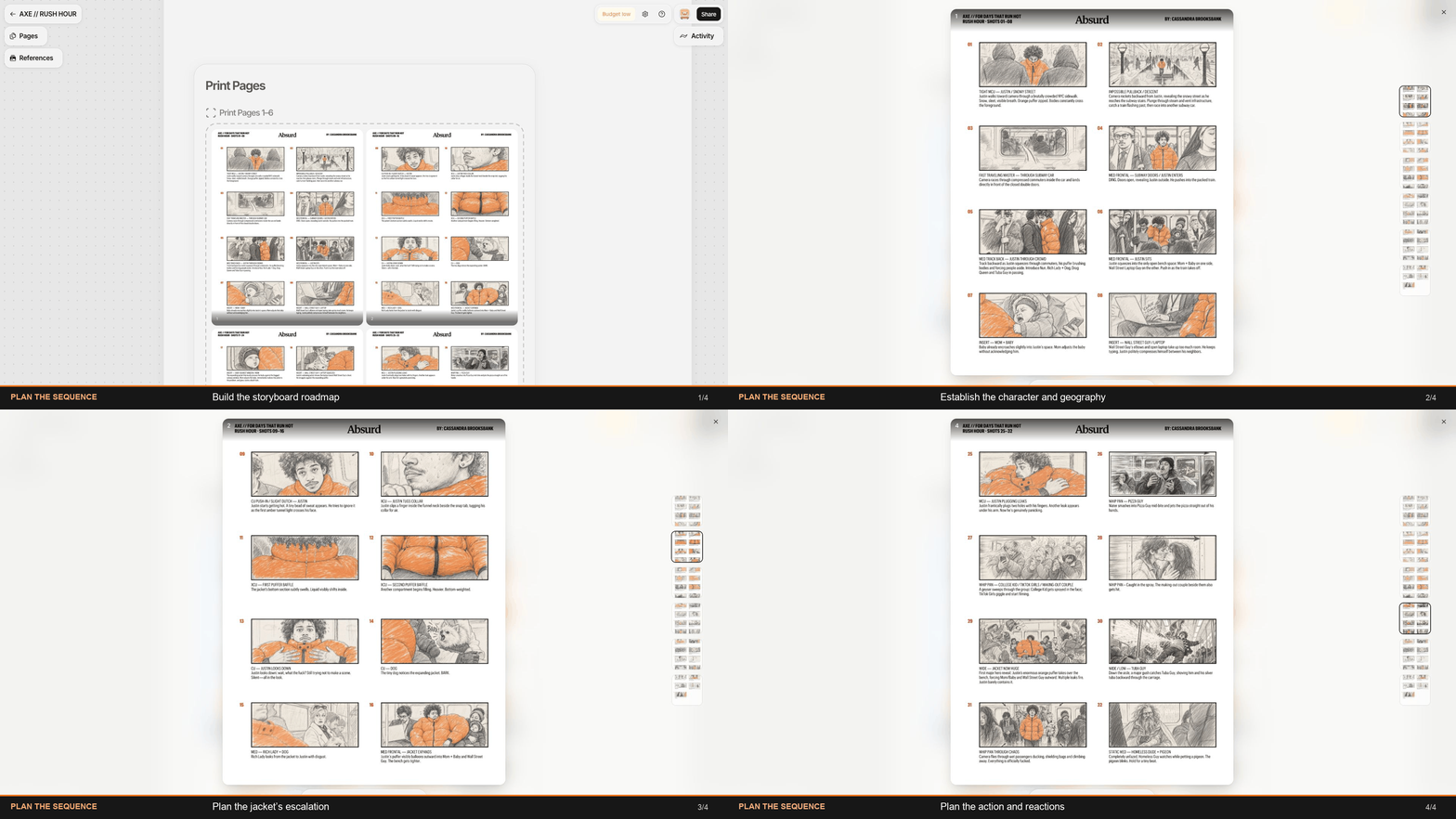
Storyboarding is another enormous part of my process. I'm one of those directors who actually does her own boards. I LOVE STORYBOARDING, but traditionally, that meant spending the better part of a week slaving in Photoshop and painstakingly constructing every frame.
This time, using Absurd, I developed the entire storyboard in less than a day. Same directing decisions. A fraction of the time.
Because I treated this as a real production, those boards weren't just pretty pictures. They became my roadmap for generating the actual commercial. I wanted to see how closely I could translate the film I'd planned on paper into finished footage using AI. Before I even generated a second of video, I could see how useful these tools could be in my work.
The Takeaway: AI doesn't need to generate your ideas to be incredibly valuable. Sometimes the biggest breakthrough is simply executing and communicating your vision faster, with more precision and fewer hours of Photoshop-induced misery, especially when you don’t have much budget or time.
2. Next, I Cast a Subway Full of Freaks
Just like on a live-action production, the next step was casting.
I had a pretty specific vision for our hero, let's call him Justin, and the colorful collection of weirdos sharing his increasingly unfortunate commute.
One thing I've learned about AI filmmaking is that if you're not specific about your characters, things go sideways pretty quickly. Suddenly you've got a train full of generic extras whose faces and clothes change between shots. Occasionally they even have seven fingers and two heads. Not ideal!
So I treated casting like a real production.
I wanted Justin to be charming, relatable, slightly overwhelmed, and able to carry a completely ridiculous situation without playing it like a cartoon. Inside Absurd, I tested several models, including GPT Image, Uni, and Nano Banana, and quickly discovered that each model has different strengths.
I initially tried designing faces with Uni. After 16 attempts, I ended up with a collection of strangely textured men who looked nothing like my guy.
Fantastic.
GPT Image 2.5 Sunburst finally delivered. Instead of sterile headshots, I generated cinematic portraits in real environments, with directional lighting and natural skin texture. Once I'd cast Justin, I used Uni 1.1 to build a multi-angle reference pack (front, profile, three-quarter, and full-body) in consistent, neutral lighting.
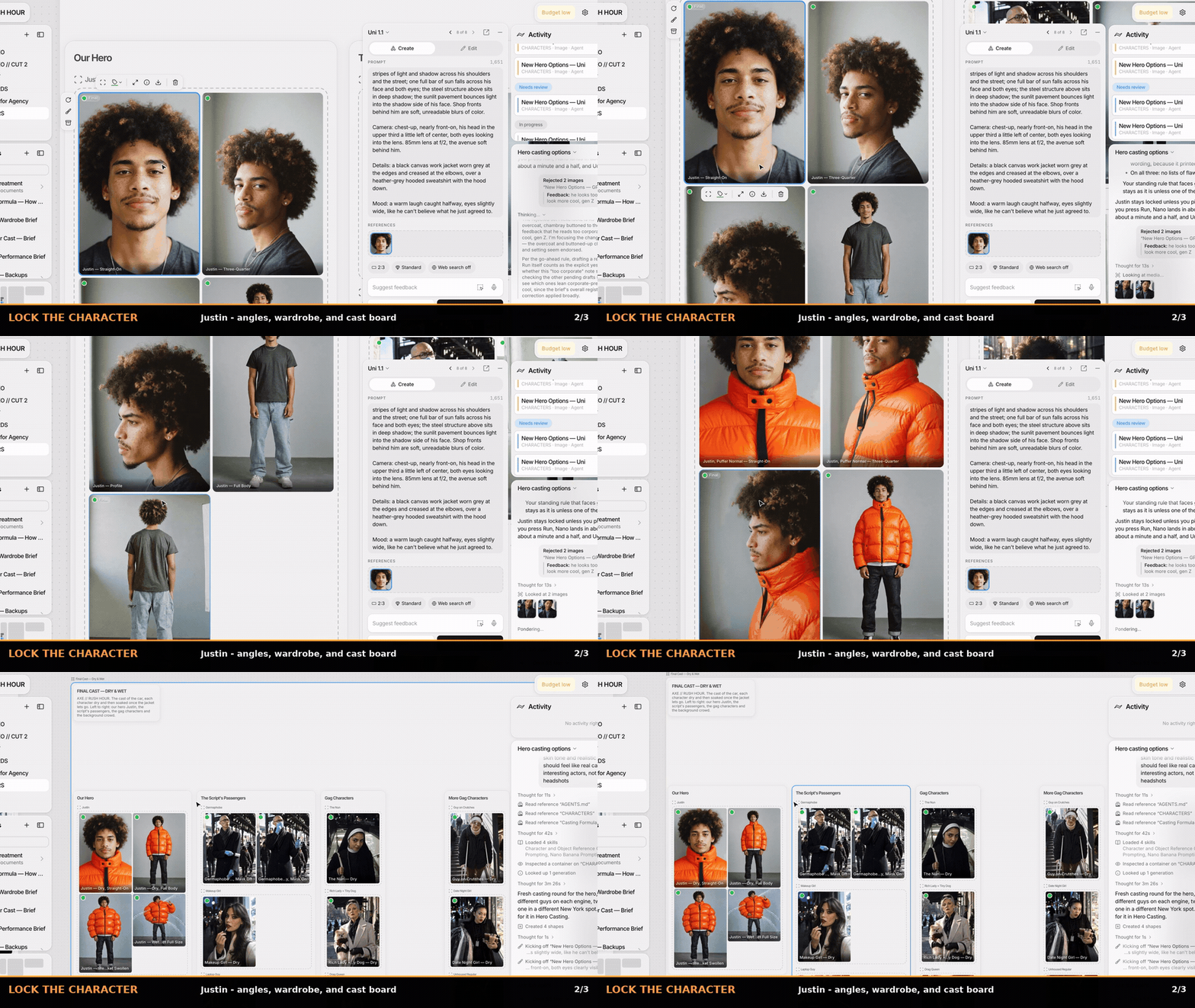
Essentially, I'd created my own digital casting department.
And to be clear, on a real production involving a recognizable actor's likeness, I'd cast a real person and secure the appropriate licensing and permissions.
For this independent spec, I developed original synthetic characters based on the qualities and casting energy I was after and did text-to-video. I imagine if I had used photos of a real person, it would be even more realistic, but this worked for this test.
Once I'd found my Justin, I locked him.
Then came the supporting cast: a germaphobe, a Wall Street finance bro, a mother and baby, a rich woman with a tiny dog, TikTok girls, a nun, and about 15 other unfortunate commuters.
Instead of generating generic extras, I cast about 20 distinct characters, complete with personalities, wardrobe, and short bios. I found that generating their initial portraits in realistic environments made them feel much more believable than generic white-background casting sheets.
Every subway has its own ecosystem of lunatics. Mine just happened to be synthetic.
Then came the world's most ridiculous wardrobe fitting.
Justin's enormous orange puffer was practically a supporting character. I designed it in Uni, explored styling in GPT, and used Ideogram to edit the wardrobe onto my locked character references without constantly regenerating his face.
Then I needed different stages of the jacket's impending disaster: normal, swollen, leaking, and ready to unleash absolute hell. I used GPT Image for the inflated versions and Nano Banana Pro for one of the leaking variations. I also developed wet and dry references for key characters so their appearances could evolve with the chaos.
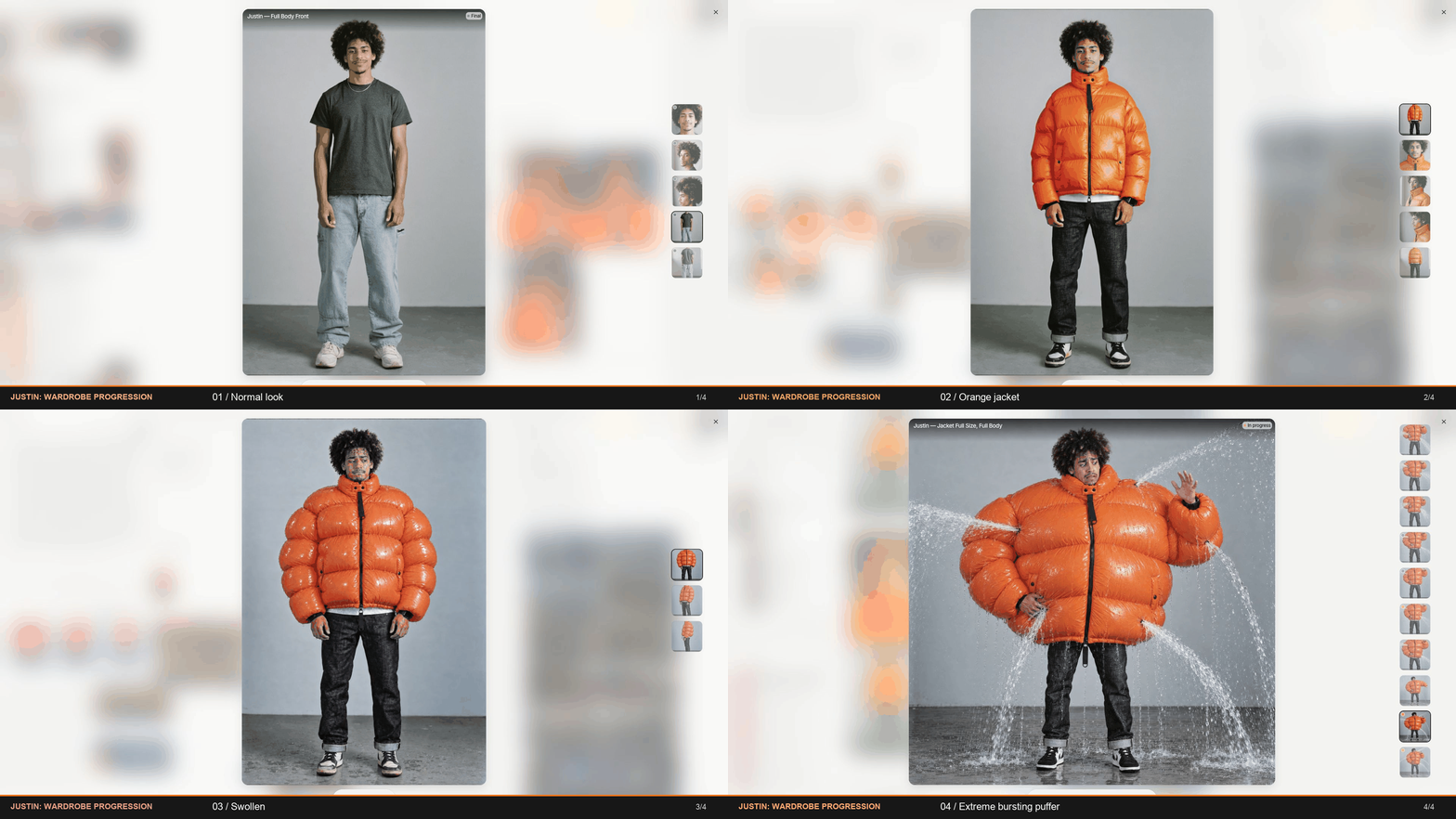
Once I'd approved my cast and wardrobe, I locked the references into Absurd's Character reference sheet.
This is where Absurd's collaborative memory became particularly useful.
The platform retained those creative decisions and automatically brought the relevant references into subsequent shots. I didn't have to constantly remind it what Justin looked like, which jacket he was wearing, or where everyone was sitting. I could spend more time directing and less time babysitting the technology.
The biggest discovery was that I didn't need one magical AI model to do everything. GPT was my casting department. Uni handled reference photography and wardrobe design. And Absurd kept the whole production organized, with the approved references carrying forward into the shoot.
Was this more upfront work than typing "handsome guy in orange jacket" into a prompt? Yes!
But by the time I started generating footage, I had an actual cast, established wardrobe, and a consistent visual library, and it stayed consistent throughout. Which is a hell of a lot better than discovering halfway through your commercial that your leading man has become an entirely different person and your supporting cast has 3 heads.
The Takeaway: Cast your characters, establish their wardrobe, and lock your references before generating footage. Different models excel at different jobs, and the more decisions you make upfront, the fewer continuity nightmares you'll face later.
3. LOCATION LOCATION LOCATION
Next up, location scouting and production design.
Just like on a real shoot, I needed to find the right locations. In this case, a New York subway car, a platform, and a bathroom. And since none of them actually existed, I had to build them from scratch.
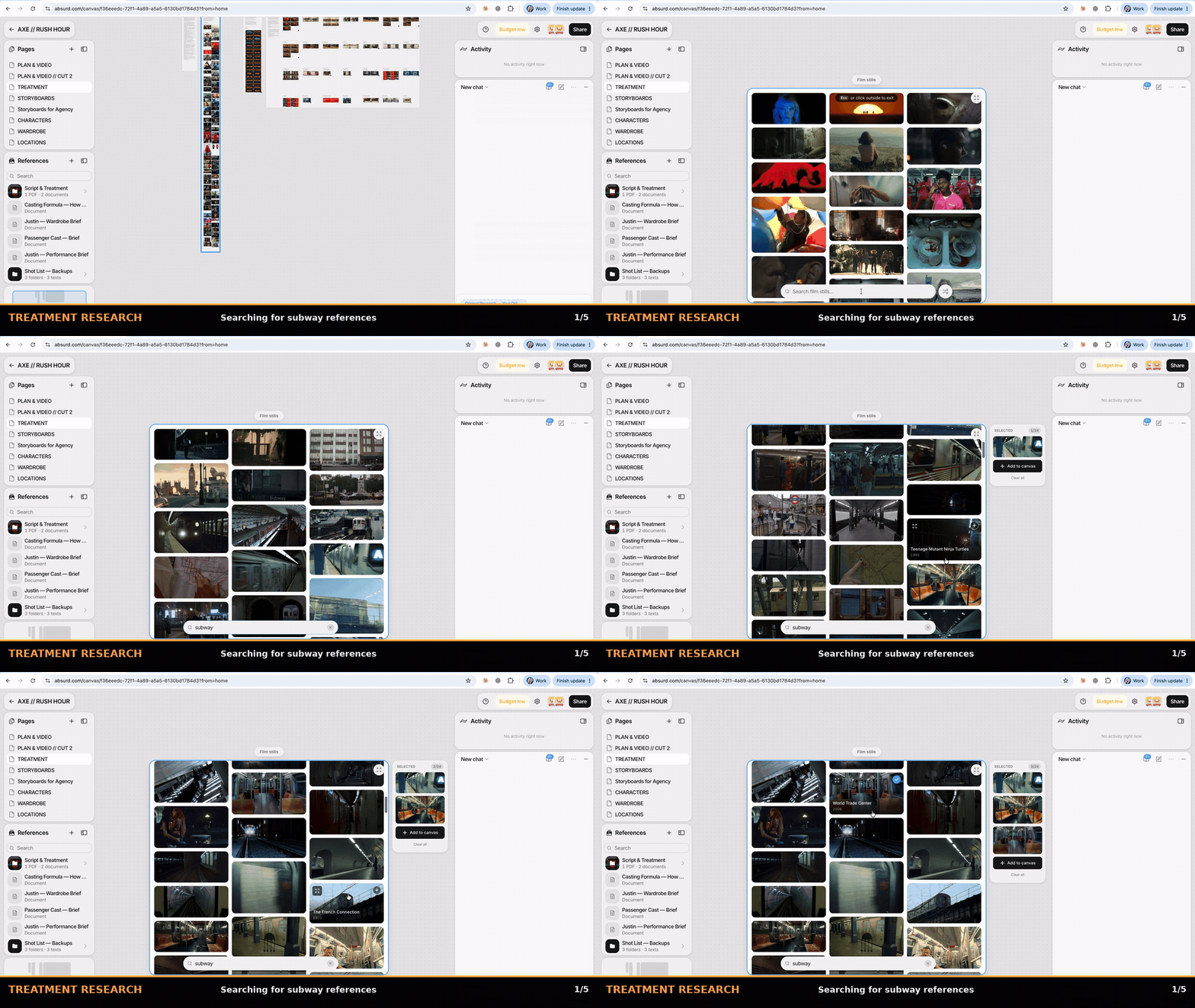
I started with moodboards, pulling references from films and commercials to establish the visual language. Then I used GPT Image 2.5 Sunburst inside Absurd to generate location options, experimenting with architecture, seating, lighting, and the appropriate amount of New York grime.
Several rounds later, I had my hero location: a slightly battered New York subway car with brushed steel, cobalt-blue seats, scuffed surfaces, and just enough graffiti to suggest the MTA hadn't cleaned it since the Giuliani administration.
I tested Uni and Nano Banana for locations too, but GPT consistently delivered the most believable environments for this project.
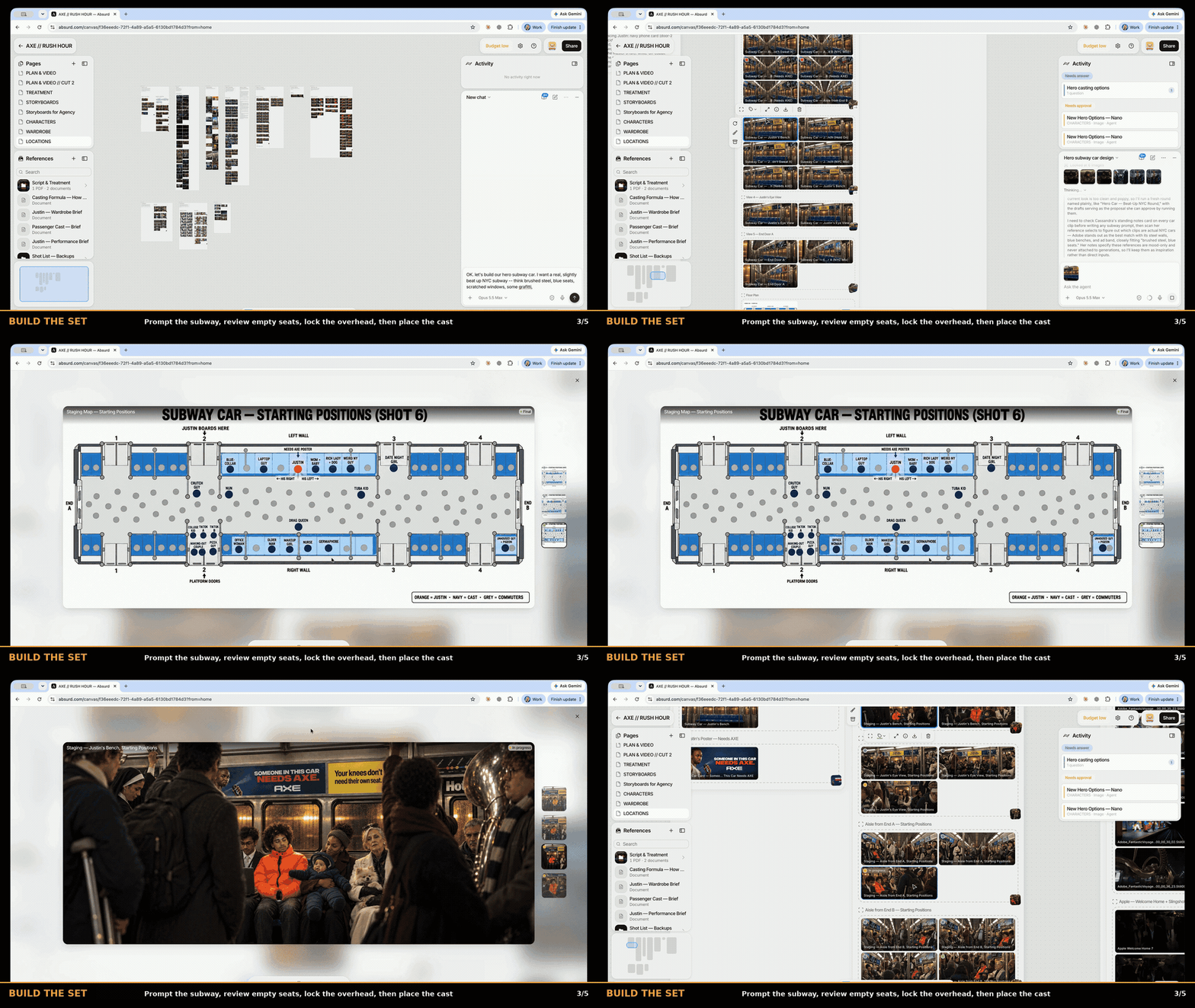
Once I'd locked my subway location, I created 360-degree reference views and an overhead, assigning each of my 20 characters a specific position. This was crucial because AI has a notoriously terrible sense of geography. One minute someone's sitting to Justin's left, the next they've teleported across the train and apparently taken the windows with them.
Absurd's memory was especially useful here. By locking the location, blocking, and character references, the agent could carry that context into subsequent shots without me having to explain where everyone was sitting every damn time. It wasn't foolproof, but it made maintaining continuity across a subway full of chaos considerably easier.
Takeaway: AI has no inherent understanding of your set's geography. Establish your locations, create an overhead, block your characters, and lock those references before you start shooting. The more complicated the scene, the more important it is to know where the hell everyone is.
4. Lights, Camera, Artificial Intelligence.
I approached the camera and lighting the same way I would on a live-action production.
I experimented with cameras, lenses, lighting, and compositions before settling on an ARRI ALEXA 35 with Panavision G Series anamorphic lenses as my visual reference. I favored longer lenses to compress the crowd and make Justin feel increasingly claustrophobic, using wider lenses to establish the geography.
One of my favorite features in Absurd was its reference library. I could pull in frames from films and commercials to show the AI exactly what I was after. I could even talk with its agent about what I liked or disliked in a particular image, which helped me articulate the lighting, composition, and visual qualities I was responding to. It felt surprisingly similar to developing a look with a DP.
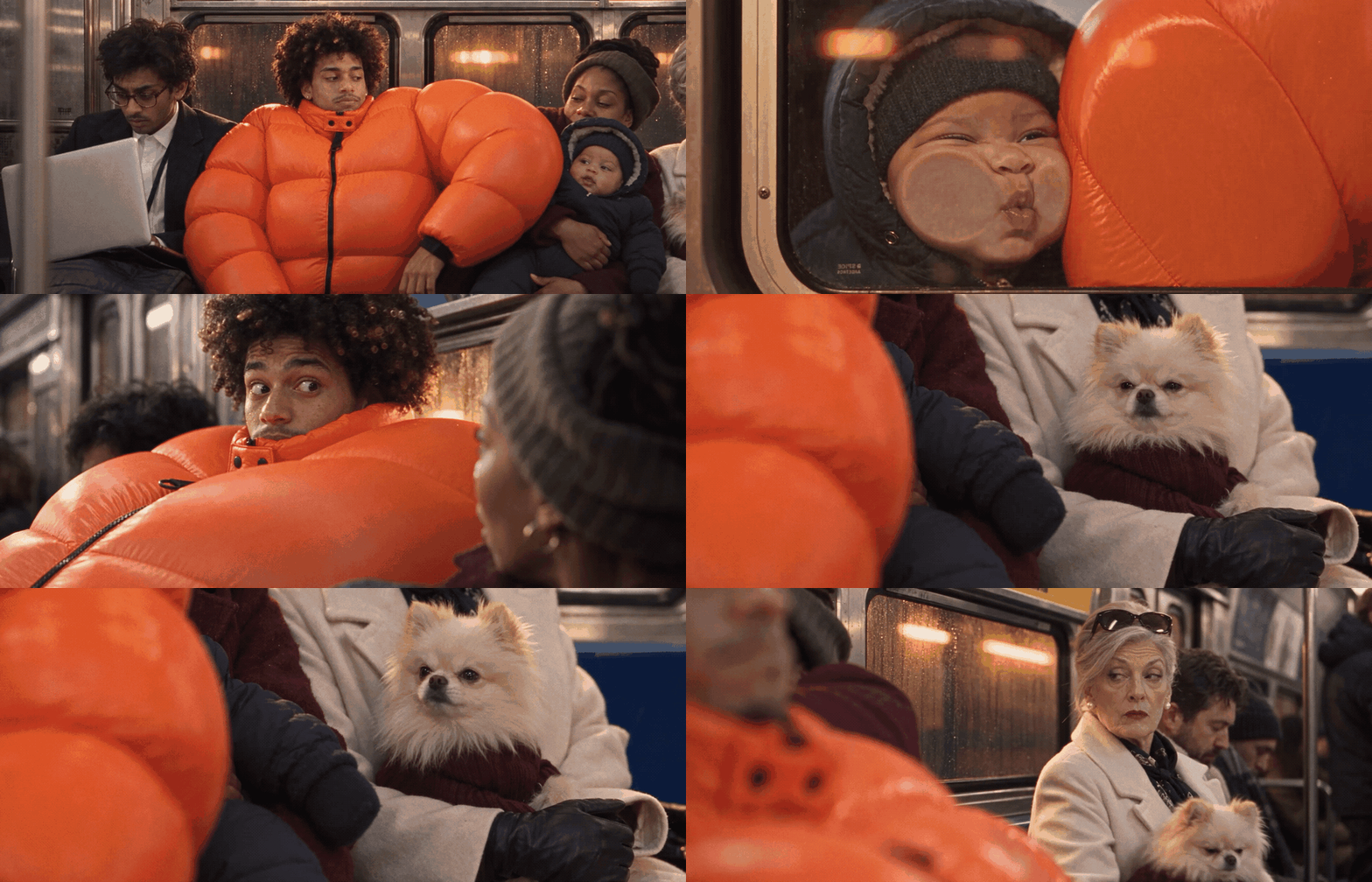
Lighting was especially important because the entire story revolves around the subway getting progressively hotter. I developed four stages: Commute, Stuffy, Pressure Cooker, and Peak Heat. As the temperature rises, the lighting warms, the atmosphere grows more oppressive, and the passengers become increasingly miserable.
By the climax, the train looks like the seventh circle of hell.
One thing I learned was that simply telling AI to make something look "cinematic" is practically useless. The more I described actual light sources, lens choices, camera positions, and exposure, the more control I had over the results. I also learned that AI doesn't always distinguish between hot and orange. Apparently, its first instinct is to turn the entire train into a giant Cheeto.
So I got specific about motivated light sources, contrast, exposure, and how the warmth should build. With my visual references and lighting rules established in Absurd, I could carry that look throughout the production without starting from scratch on every shot.
The takeaway: Don't just prompt for "cinematic." Develop a visual language, use real references, and learn to articulate exactly what you like and why. Taste is still your most valuable tool.
5. ACTION! (Except Nobody's Actually on Set)
Finally, it was time to “shoot” the damn thing.
My initial instinct was to generate every shot individually, like a traditional shoot. But I found that grouping shots into sequences and using Seedance 2.5’s multi-shot produced more cohesive results. I imported my 48-shot list into Absurd and organized it into sequences of roughly 3–5 shots, each with specific blocking, camera angles, lighting, action, and performance beats.
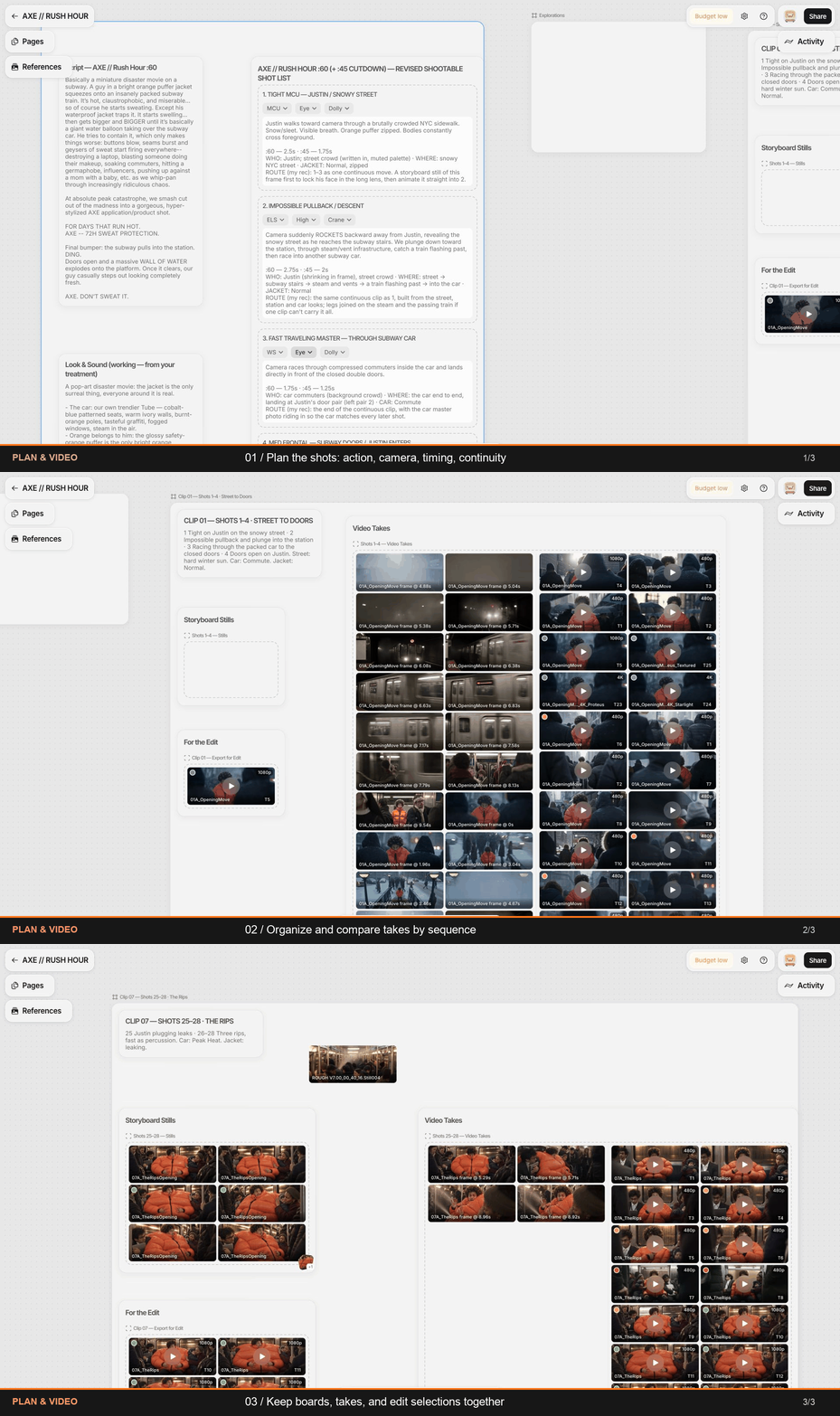
Then came prompting. And here's where traditional filmmaking experience became genuinely valuable.
Rather than typing "epic cinematic shot, photorealistic, 4K masterpiece" and praying, I treated each prompt like a detailed set of directing notes, specifying lenses, camera moves, lighting, character motivations, and even where I wanted cuts to happen.
I also discovered that directing AI actors is weirdly similar to directing real ones.
Ask for a "funnier" performance, and you'll get wildly exaggerated cartoon nonsense. But give the character an actual motivation (ie: "Justin is desperately trying to act normal because he doesn't want anyone noticing he's sweating through his jacket"), and suddenly the performance becomes much more believable.
I applied the same philosophy to the effects. One of my standing rules was that everything had to obey real-world physics. The jacket could inflate to ridiculous proportions, but it had to behave like something a practical effects team could actually pull off. Water had weight. Pressure had consequences. No magical VFX nonsense.
Absurd has a feature where you can create “project rules” which was cool because I could establish those creative rules once, and its agent would carry them into subsequent prompts without me having to repeat myself every damn time. I did that for many things like "nobody plays the joke" and "the crowd should feel caught on camera, not arranged for it," which the agent could carry into subsequent generations without me constantly repeating myself.
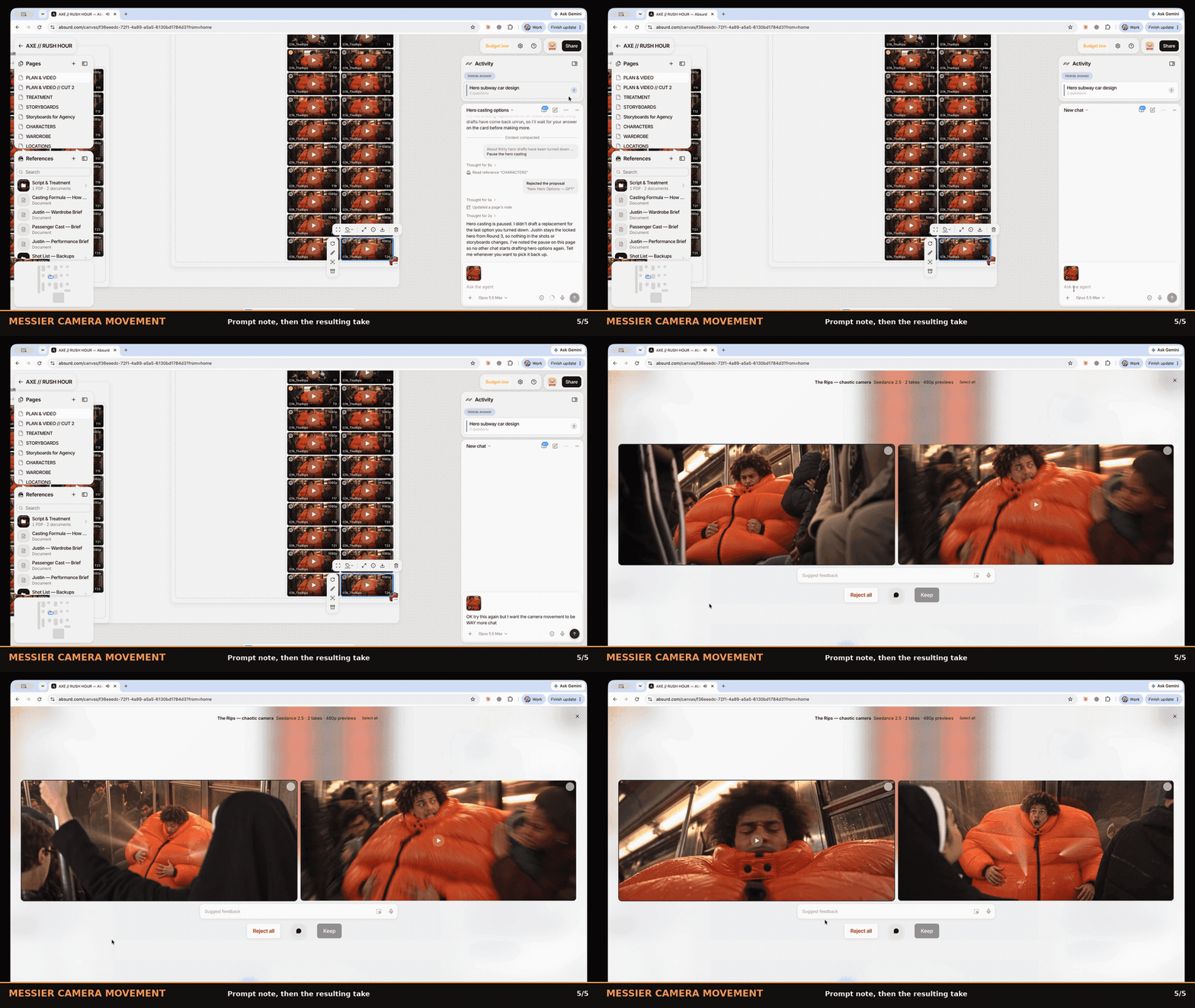
For video, I primarily used Seedance 2.5, generating sequences around 10 seconds long. I'd start with two low-resolution 480p takes, review and refine them, then render my approved selections at 1080p. Absurd's budget tracking helped me keep costs under control.
Because here's another thing directing has taught me: you have to know when you've got the shot.
On a real set, you don't have unlimited time or money. You get the best take you can, decide what will work in the edit, and move on. I approached AI the same way, although being able to generate a pickup without organizing another shoot day was a pretty fantastic bonus.
I also found that imperfection helped sell the realism. AI loves pristine compositions and impossibly smooth camera moves, so I deliberately introduced handheld movement, whip pans, crash zooms, and imperfect framing. Sometimes a little controlled chaos did more to make the footage believable than another hour of prompting.
The actual video generation took roughly two days. Once I'd approved my takes, I organized the finals in Absurd and downloaded them for the edit.
Takeaway: Direct AI like a real production. Give actors motivations, establish the physical rules of your world, plan your coverage, and know when to move on. More generations don't automatically make a better film.
6. Fix It in Post!
Editing is probably my favorite part of filmmaking. I always shoot for the edit. If you compare my shot list and storyboards with the finished commercial, you'll see how closely the final edit follows the original plan.
This project was no different.
I brought my selected takes into Premiere and cut the spot like any live-action commercial. And honestly? I was surprised by how little I needed to regenerate. I only went back for two or three shots, and I probably could have made the original takes work.
Of course, that's one of the really exciting advantages of AI. Need a pickup, a different angle, or an insert? You can generate it without organizing a whole new shoot day. I can see that being incredibly useful on traditional productions too, especially for establishing shots, inserts, or elements that would otherwise eat up valuable time and budget, as long as they can be integrated convincingly.
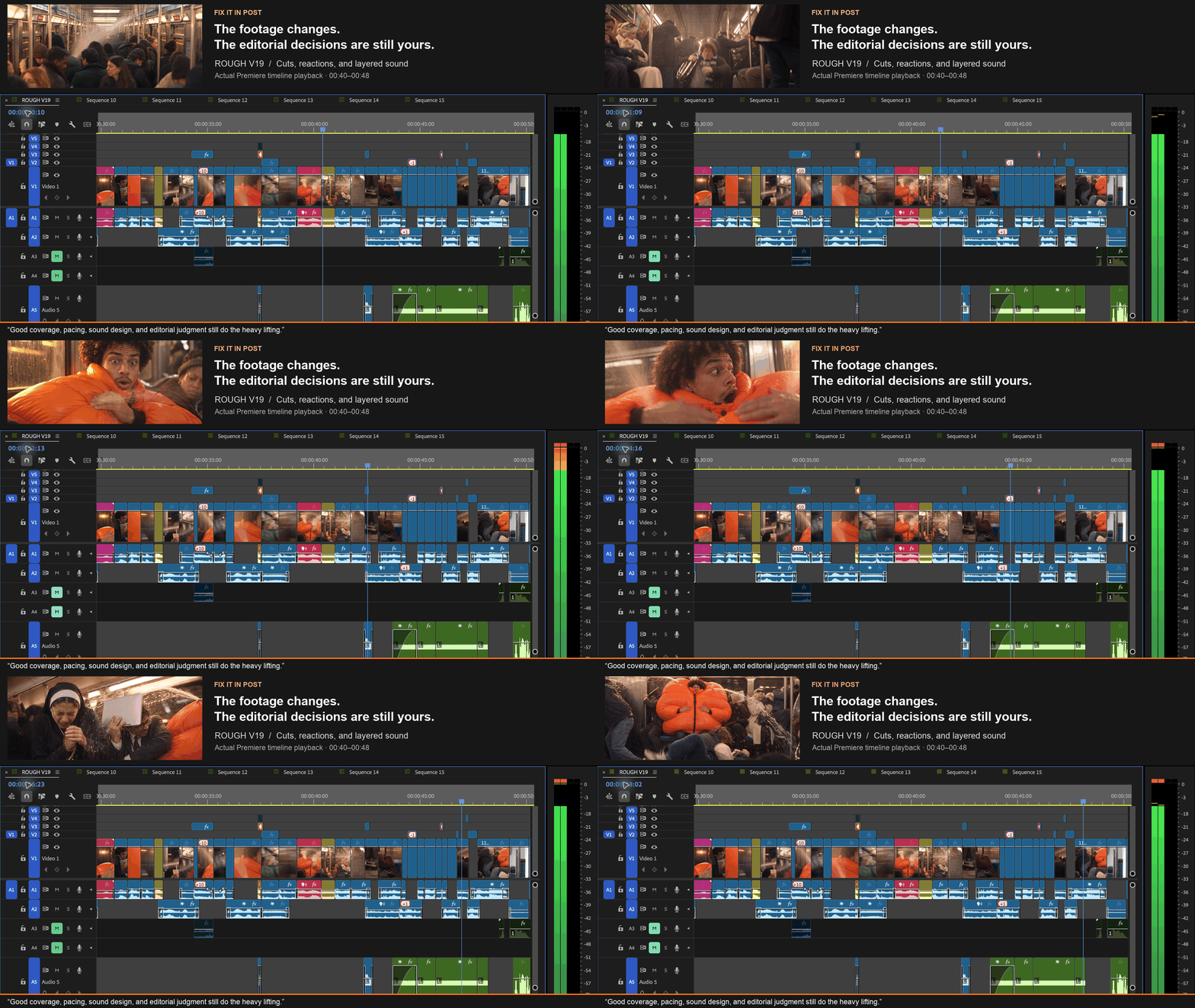
Sound design was especially important here. I built the tension through escalating train risers, stretching fabric, hissing pressure, and increasingly aggressive transitions. I also used little bursts of messy camera movement, sometimes just a frame or two, to make the action feel more chaotic as the pace accelerated.
Comedy is all about timing, and that is the same in live-action as well as AI. When do you reveal the joke? How long do you hold the reaction? How much tension can you build before everything goes to shit?
Those are the same decisions I'd make in any edit. The footage just happened to come from a different source.
Takeaway: Shoot for the edit, no matter how you generate the footage. Good coverage, pacing, sound design, and editorial judgment still do the heavy lifting. And having the option to generate a pickup without a reshoot? That's a pretty fantastic bonus.
7. The Final Polish: Color, Grain, and a Little Damage Control
Of course, AI still has its quirks. A few subway signs contained complete gibberish, so I had to roto and replace them with actual signage, including a 69th Street sign (lol, I’m immature). I also had a handful of bizarre AI hallucinations that I masked out with minor VFX cleanup.
For the final polish, I brought in my friend Andrew Fletcher, a cinematographer, to help with color and finishing. I was already pretty happy with the look straight out of the model, so the goal wasn't to reinvent it, but to make the whole thing feel more cohesive and photographic.
Andrew brought the finished cut into DaVinci Resolve, used scene detection to separate the shots, and graded them individually. Since AI footage arrives with its color baked in, he worked in a larger color space to make subtle adjustments without breaking the image, focusing particularly on consistent, natural skin tones.
"I was actually surprised by how much flexibility the footage had," Fletcher explains. "It held up better than I expected. Most of the work was refining what was already there rather than trying to fix it."
To finish, he used Filmbox Pro to add 250D film grain and a touch of halation, softening the overly pristine digital look and giving the footage a more photographic texture.
What I found interesting was how familiar this entire stage felt – editing, sound design, VFX cleanup, color, grain, mix — all the same finishing disciplines I'd use on a traditional commercial.
The footage might have been generated by AI, but it still needed to be finished like a film.
Takeaway: AI footage isn't necessarily finished when it comes out of the generator. Traditional post-production techniques can make an enormous difference, and a proper finishing pass can help turn a collection of generated clips into a cohesive film.
I Still Love Live Action. But Damn, This Is Interesting.
I'll be honest. Before I started experimenting with AI, I was pretty skeptical. And if someone had handed me a million dollars to shoot this commercial for real? I would've preferred that in a heartbeat.
Unfortunately, AXE did not throw a million bucks at my exploding sweat jacket, and the idea has been dead for 5 years. So… turns out AI was a pretty fantastic Plan B.
What surprised me most was how similar the process felt to directing a live-action production. I still developed a treatment, cast my characters, designed the locations, planned my coverage, directed performances, and cut the whole thing together. I just did it without leaving my office.
Which has its advantages! And its disadvantages… I happen to like actual humans and traveling to remote locations for a shoot. But given the time and budget constraints, I was pretty blown away by how close I could get to the film I'd originally imagined.
One of my biggest lessons was that the workflow matters just as much as the models. The technology is changing so fast that whatever model you're obsessed with today will probably have a better version by next Tuesday.
What I found valuable about Absurd was that the platform kept everything organized in one place, with shared project memory that tracked my characters, references, creative decisions, and production notes as the film evolved. I could talk to it like I would to an actual production crew, without having to learn “robot.”
And I can see that being incredibly useful beyond fully AI-generated projects. On a live-action production, I could collaborate with my DP, production designer, or agency creatives in the same workspace, developing references, sharing storyboards, and getting feedback without everything disappearing into an endless chain of emails and PDFs.
Ultimately, I don't see this as an either/or situation. I love physical production. I love working with actors, stunt teams, and great crews. I'm not interested in replacing any of that. But I am interested in having more ways to make ambitious ideas happen, whether that's previsualizing a complicated action sequence, generating an insert, or bringing an entire commercial to life when the budget simply isn't there.
This experiment reinforced one thing for me: AI can generate images. It can't decide which images are worth making.
It doesn't know what makes a joke funny, when to hold a reaction, or how to make an audience care about a character. Those are still creative decisions. You still need taste, judgment, and a point of view.
And as for me?
I've got a pretty substantial graveyard of ambitious ideas that never got made.
Now I've got a shovel.
CREDITS:
For Days That Run Hot is an independently produced, unofficial AXE spec commercial based on an original concept developed at The Martin Agency.
- Director: Cassandra Brooksbank
- AI Production Platform: Absurd
- Executive Producer: Philip Ho
- Original Creative Team: Cameron Higginbotham (Copywriter), Emily Delius (Art Director), Mik Manulik (Creative Director), Ashley Marshall (Executive Creative Director)
- Color & Finishing: Andrew Fletcher
Cassandra Brooksbank is represented by CAA and Fancy Content.